


Jump Starter with Air Compressor
Jump Starter with Air Compressor
HIGH DEMAND
⚡ Ready to Start ➜ Any Vehicle, Any Moment
🌬️ Fast Tire Inflation ➜ Built‑in 300 PSI Air Compressor
🔋 Long‑Lasting Power ➜ 28,000mAh Battery Capacity
🛡️ Drive With Confidence ➜ 10 Smart Safety Systems
📱 Power Bank ➜ Perfect for Travel & Emergencies
Couldn't load pickup availability
- Visa payment method
- American express payment method
- Paypal payment method
- Apple pay payment method
- Google pay payment method
- Stripe payment method
- Maestro payment method
- Master payment method
 Free delivery
 Dedicated support
 Easy returns
What vehicles and devices can this product start?
What vehicles and devices can this product start?
➤This Jump Starter works with any 12V battery device.
➤This includes cars, motorcycles, boats, yachts, lawnmowers, ATVs, and other gas or diesel engine vehicles.
➤As long as the device uses a standard 12V battery, this product can jump-start it.
How do I charge the Jump Starter?
How do I charge the Jump Starter?
➤Use the included USB-C cable with a qualified charger.
➤A certified 5V/3A or fast charger is recommended for best results.
➤Any 5V charger with a USB-C port (including car chargers) can also charge the product.
How often should I charge the product if I'm not using it?
How often should I charge the product if I'm not using it?
➤Charge the battery at least once every 3–4 months to maintain performance.
➤Prolonged storage without charging may reduce battery efficiency and capacity over time.
Shipping & Returns
Shipping & Returns
Shipping
We offer free and secure shipping throughout Romania. Most orders are delivered within 14-21 business days, and you'll receive a tracking number via email as soon as your order ships.
Want more details? Read our Shipping Policy
Returns
Not completely satisfied? No problem. We offer a 30-day return policy —simple, stress-free, and no hard feelings. If the product isn’t right for you, just contact us and we’ll guide you through the return process.
Need more info? Read our Returns & Refunds Policy
Need Help?
Have a question or need assistance? Email us anytime at support@selion.net — we're here to help and respond quickly.


4‑in‑1 Jump Starter
Dead battery. Freezing cold. Middle of nowhere. Alone. But you already have the solution with you.

Frequently Asked Questions
How do I jump-start my car step by step?
How do I jump-start my car step by step?
- Step 1 – Power Up: Press and hold the power button for 1.5 seconds, then check the battery level. If the jump starter is below 20%, charge it first.
- Step 2 – Connect Device: Locate the 12V jump start port on the left side. Plug the clamps cable in firmly until you hear a click.
- Step 3 – Connect to Battery: RED clamp → Positive (+) terminal. BLACK clamp → Negative (−) terminal. Wait for "12V READY" on the display.
- Step 4 – Start Vehicle: Press the START button. You have 60 seconds after "12V READY" to start the engine.
- Step 5 – Disconnect: Remove clamps in reverse order (black first, then red). Unplug the cable from the device.
The device shows "DO NOT START" — what does this mean?
The device shows "DO NOT START" — what does this mean?
This warning appears for one of three reasons:
- Battery below 20%: Charge the product fully (above 20%) before use.
- Temperature protection active: High or low temperature detected. Allow the device to reach normal operating temperature.
- Startup connection failure: Reconnect the clamps correctly to the car battery terminals.
The display shows "Auto Disconnection" — what happened?
The display shows "Auto Disconnection" — what happened?
This means the clamps have been connected to the car battery for over 1 minute without a start attempt. Restart the product after shutting it down, then disconnect one clip and reconnect it to the battery terminal to reset.
How many consecutive start attempts can I make?
How many consecutive start attempts can I make?
Limit consecutive start attempts to a maximum of 5 times. Exceeding this can damage the product and void the warranty. If the vehicle still does not start after 5 attempts, diagnose the root cause before trying again.
What is the Force Start function and when should I use it?
What is the Force Start function and when should I use it?
Force Start is for situations where the car battery is completely dead or cannot be detected. Press and hold the Force Start button for 3 seconds to activate it.
⚠ Important: During Force Start, the device's safety protection is temporarily disabled. Short circuits and reverse connections are strictly prohibited and can be dangerous. Use this function with caution.
What can I inflate with this product?
What can I inflate with this product?
The built-in air compressor supports 5 inflation modes: car tires, motorcycle tires, bicycle tires, sports balls, and other inflatable items. The included 4 nozzle adapters allow you to connect to nearly any valve type. Inflation range: 3 – 300 PSI / 0.2 – 20.7 BAR.
How do I use the inflation feature?
How do I use the inflation feature?
Step 1: Hold the power button (1.5 sec), then press "M" to switch to inflate mode. Pull out the air hose.
Step 2: Screw the hose onto the tire valve. Check the current PSI. Default is 36 PSI.
Step 3 (optional): For hard-to-reach valves, attach the extension hose.
Step 4: Tap "M" for mode, hold "M" to switch between PSI/BAR/KPA units. Use +/− to set your target pressure.
Step 5: Quick-press power to start inflating. The device auto-stops when target pressure is reached.
The air hose connector gets very hot — is this normal?
The air hose connector gets very hot — is this normal?
Yes, this is normal. The metal connector between the air hose and the pumpwill heat up after extended use. Do not touch it directly to avoid burns. Allow it to cool down before handling or storing.
Can I inflate tires while the product is being charged?
Can I inflate tires while the product is being charged?
No.The inflation feature cannot be used while the product is charging. Please fully disconnect the charger before using the air compressor function.
Can I charge other devices using the USB ports while the product is being charged?
Can I charge other devices using the USB ports while the product is being charged?
No.Using the USB output ports to charge other devices while the Jump Starter itself is charging may damage the product. If you urgently need to charge another device,temporarily stop charging this product first.
What are the USB output specifications?
What are the USB output specifications?
USB-C Input: 5V⎓3A / 9V⎓2A
USB-C Output: 5V⎓3.1A
USB-A Output: 5V⎓3.1A
Why isn't my USB-C port charging other devices?
Why isn't my USB-C port charging other devices?
This may be a compatibility issue. Try using the USB-A output port instead. The USB-A output supports 5V⎓2.4A and is compatible with a wider range of devices.
What are the dimensions and weight of the product?
What are the dimensions and weight of the product?
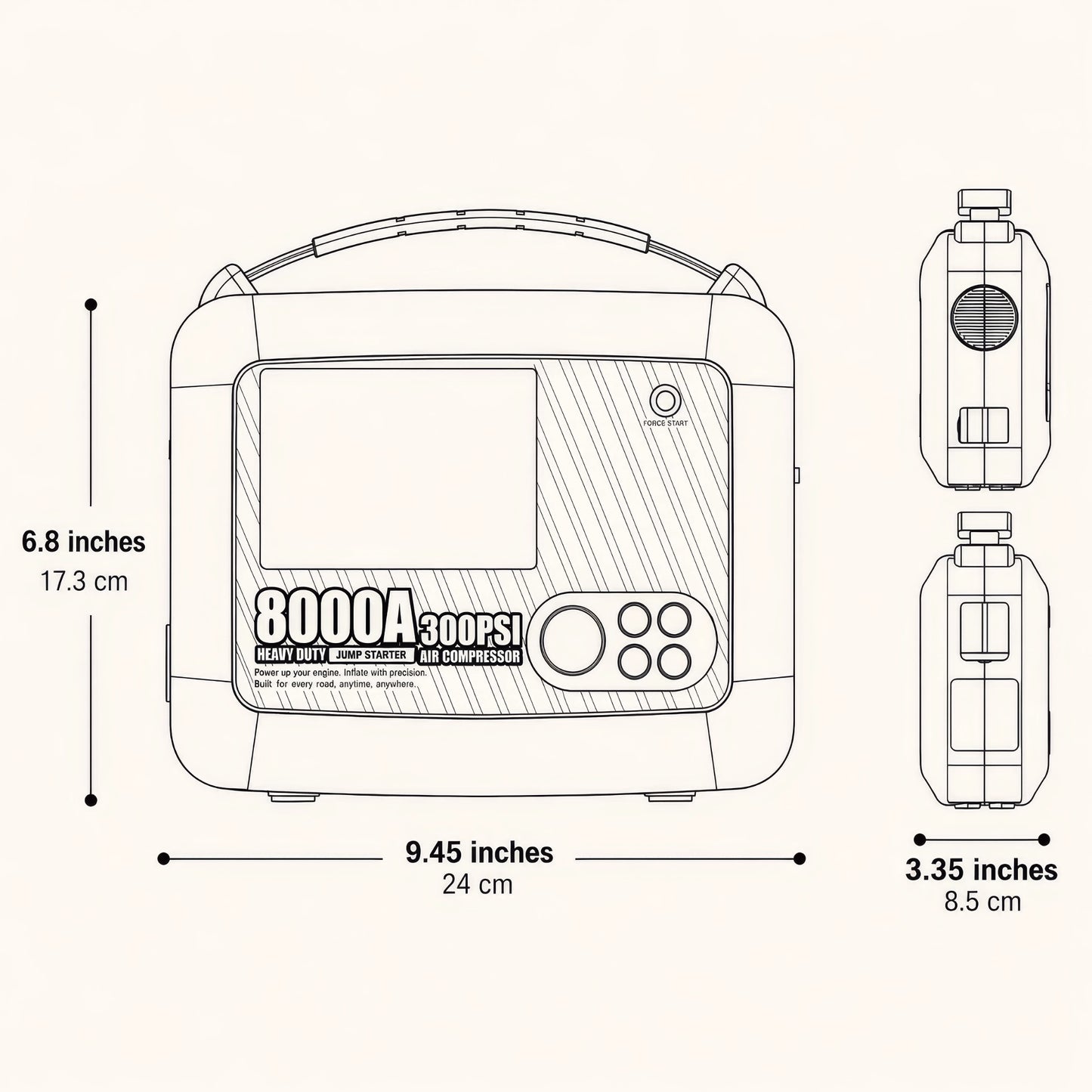
Dimensions:9.45" L × 6.81" W × 3.35" H (240 × 173 × 85 mm)
Weight:1.7 kg / 3.74 lbs
How should I store the Jump Starter when not in use?
How should I store the Jump Starter when not in use?
For optimal storage:
- Store at 60–80°F / 15–27°C
- Keep battery above 40% charge for best battery life
- Keep away from direct sunlight
- Do not store outdoors when not in use
- Store in a cool, dry place
How do I clean the product?
How do I clean the product?
- Use a soft, dry cloth to clean the exterior
- Avoid liquid cleaners — do not rinse the product with water
- Keep ports free of dust and debris
- Keep connections clean and free of corrosion
- Inspect cables before each use
Can I use the product in wet or dusty conditions?
Can I use the product in wet or dusty conditions?
No.Use the product only in a dry and clean environment. Exposure to sand, dust, or water may cause damage.
What is the operating temperature range?
What is the operating temperature range?
The product operates between -20°C and 60°C (-4°F to 140°F). In very cold or very hot conditions, the built-in temperature protection will activate and display a warning. Allow the device to return to a normal temperature before using it.
-
Free delivery
Delivered to your doors at no extra cost.
-
Dedicated support
We are always available to answer your questions.
-
Easy returns
You can try and test our products completely risk-free.